Chart of Accounts
Chart of Accounts is used to refer to the organization of all accounts in a financial system. Navigate to the chart of accounts from the Sidebar:
Organization of Accounts
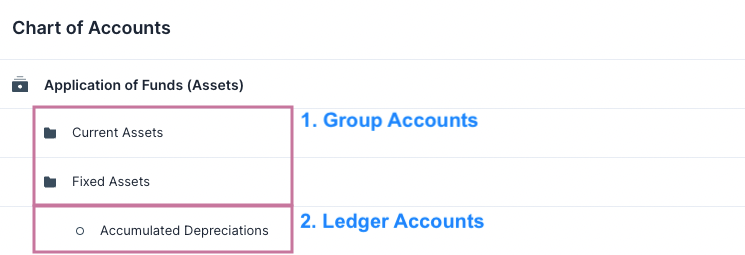
There are two types of accounts in the Chart of Accounts
- Ledger Accounts: Accounts that are used in the transactional entries and that appear in the General Ledger.
- Group Accounts: Accounts that are used to group other Group and Ledger accounts.
Root Accounts
At the upper most level there are 4 Group Accounts. These can be thought of as the Root Accounts. These Root Accounts have all the other accounts grouped underneath them.
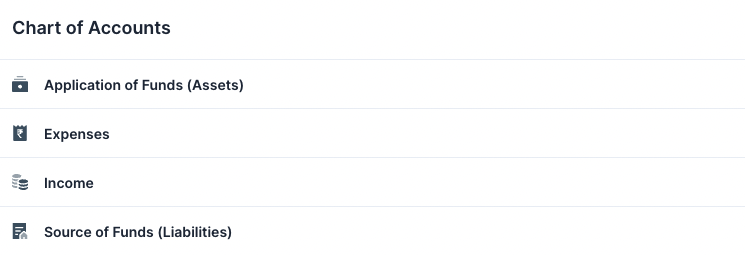
::: info Number of Root Accounts The number of Root Accounts depends on your country's CoA. For example: The Indian CoA has only 4. Whereas the Standard Chart of Accounts has 5. :::
Each Root Account is either a Credit or a Debit account. If a Root Account is a Credit account all the accounts underneath it will also be a Credit Account. (Credit and Debit)
Other Accounts
Clicking on a Root Account will reveal the accounts other it. This goes for the other Group
Accounts too.
Clicking on a Ledger Account will open that accounts Quick Edit Form where the details of the account can be viewed.
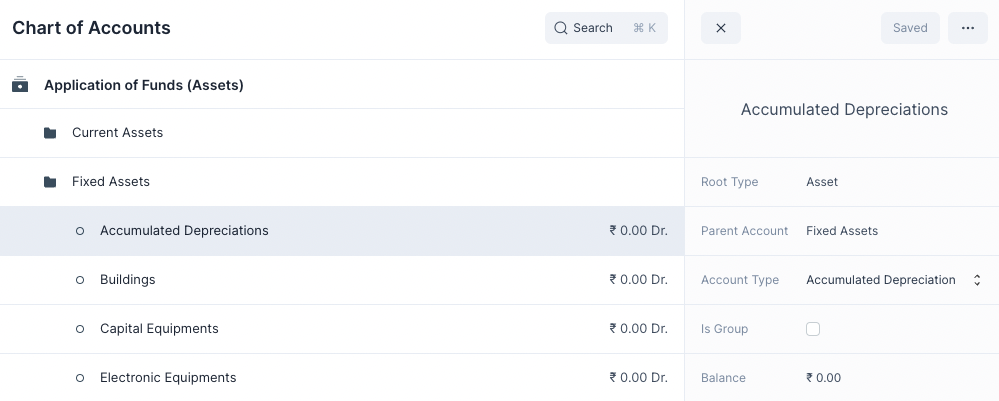
Creating a New Account
To create a new account
- Hover over a Group Account.
- Click on Add Account or Add Group.

This will display a new row where you can enter the account name. After you are done press Save to create the account.